Upgrade, downgrade or cancel your OryonIQ plan, switch between monthly and annual billing, and learn how proration, refunds and the 3-day cutoff work.
The OryonIQ upgrade page is where you subscribe to a paid plan, move between Pioneer, Explorer and Navigator, switch billing cycles or end your subscription. You reach it from the Upgrade plan button on your profile. A short billing policy at the top covers proration and refunds.
Annual prices, each with 2 months free
Launchpad is free. Paid plans cost $45, $99 or $150 a month. Compare what each one includes in Plans and tiers.
How do I get to the upgrade page?
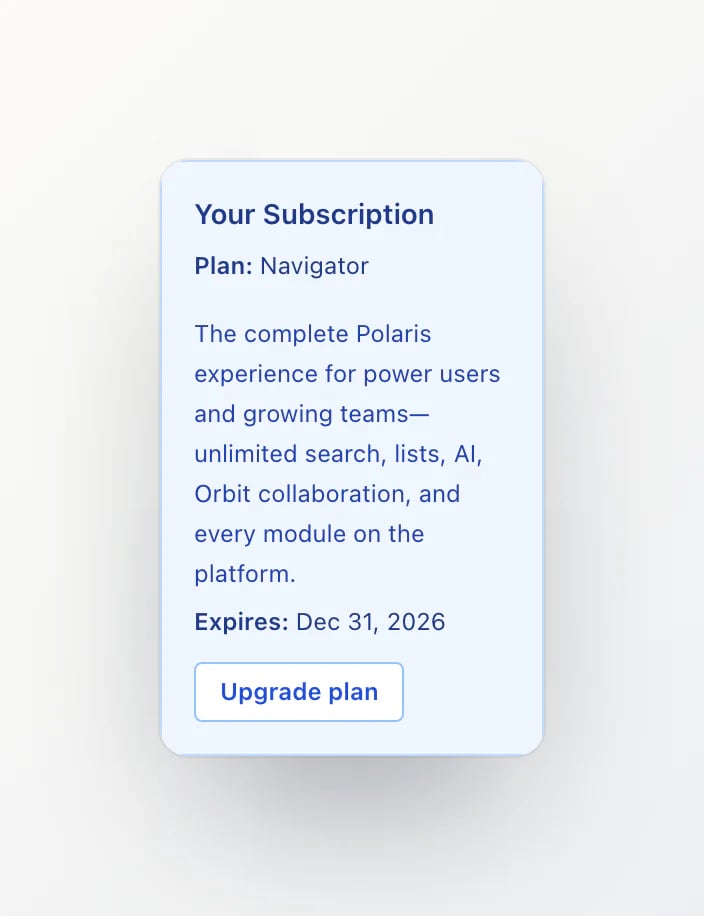
Select your avatar at the top right and choose Settings, or select Edit on your dashboard profile card. In the left column, find the Your Subscription card and select Upgrade plan. Typing app.oryoniq.com/upgrade into your browser works too.
Upgrade plan sits on the Your Subscription card
How do I upgrade my OryonIQ plan?
1
Read the billing policy
The policy sits above the plan cards. The main points are summarized further down this page.
2
Choose Monthly or Annual
Use the toggle above the plan cards. Annual prices show “2 months free” under each price.
3
Select your plan
On Launchpad, each paid plan’s card has a subscribe button, such as Subscribe to PIONEER or Subscribe to EXPLORER. On a paid plan, the buttons name the plan you’d move to, such as Change to EXPLORER or Change to Navigator.
When you upgrade, you pay a prorated amount that day. Unused time on your current plan is credited toward the higher plan.
Your current plan’s card shows End subscription where the other cards show a change button. Flip the toggle to the other billing cycle and your own card gets a change button too, such as Change to Navigator if you’re on Navigator. That’s how you move between monthly and annual billing on the same plan.
Monthly and annual prices
Plan
Monthly
Annual (2 months free)
Pioneer
$45 a month
$450 a year
Explorer
$99 a month
$990 a year
Navigator
$150 a month
$1,500 a year
What is the OryonIQ billing policy?
Change
What happens
Upgrade
You’re charged a prorated amount today, and unused time on your current plan is credited toward the higher plan.
Downgrade
The lower plan takes effect at the end of your current billing period. There’s no refund or credit for unused time.
Cancel
Your subscription ends with no refund or credit for unused time.
Timing
Any change (upgrade, downgrade, cancellation or billing cycle switch) must be requested at least 3 days before your current term ends. In those last 3 days, changes are unavailable until the term ends or renews.
If you want to switch or cancel near the end of your term, do it at least 3 days before the term ends. The upgrade page won’t accept changes in the final 3 days.
How do I cancel my OryonIQ subscription?
Open the upgrade page and select End subscription on your current plan’s card. Make the request at least 3 days before your term ends. OryonIQ doesn’t refund unused time when you cancel.
Frequently asked questions
Can I cancel my OryonIQ subscription?
Yes. Select End subscription on your current plan’s card on the OryonIQ upgrade page, at least 3 days before your term ends. There are no refunds or credits for unused time.
Does OryonIQ prorate upgrades?
Yes. When you upgrade an OryonIQ plan, you pay a prorated amount that day, and unused time on your current plan is credited toward the higher plan.
Do I get a refund if I downgrade my OryonIQ plan?
No. OryonIQ gives no refunds or credits for unused time when you move to a lower plan. The downgrade takes effect at the end of your current billing period.
How do I switch from monthly to annual billing in OryonIQ?
On the OryonIQ upgrade page, set the toggle to Annual and select the button on your own plan’s card, such as Change to Navigator if you’re on Navigator. Annual billing gives you 2 months free.
Who can help me choose an OryonIQ plan?
The OryonIQ team can. Message them through the orange support chat bubble at the bottom right of the app, or compare plans first in Plans and tiers.To update your company details or NAICS codes, go back to Profile and settings.
Last modified on October 10, 2026
Was this page helpful?
{"docsConfig":{"theme":"mint","$schema":"https://mintlify.com/docs.json","name":"OryonIQ","description":"OryonIQ Help Center: guides for finding federal, state and local contracts, award data, Ask Oryon answers and teaming partners in OryonIQ.","colors":{"primary":"#C2410C","light":"#FB923C","dark":"#C2410C"},"logo":{"light":"https://mintcdn.com/oryoniq/IfZ4PQOB9ucK2p5X/images/logo-light.png?fit=max\u0026auto=format\u0026n=IfZ4PQOB9ucK2p5X\u0026q=85\u0026s=2cc19058229df1bbf4bdc1af95dc4112","dark":"https://mintcdn.com/oryoniq/IfZ4PQOB9ucK2p5X/images/logo-dark.png?fit=max\u0026auto=format\u0026n=IfZ4PQOB9ucK2p5X\u0026q=85\u0026s=08880a64e310dedecce1f9aa9ee910ba","href":"https://oryoniq.com"},"favicon":{"light":"https://mintcdn.com/oryoniq/O8WwUbXUsq20yiMn/images/favicon.png?fit=max\u0026auto=format\u0026n=O8WwUbXUsq20yiMn\u0026q=85\u0026s=bde0d4603d3f251a4519a17f4397c857","dark":"https://mintcdn.com/oryoniq/O8WwUbXUsq20yiMn/images/favicon-dark.png?fit=max\u0026auto=format\u0026n=O8WwUbXUsq20yiMn\u0026q=85\u0026s=28811860766bbe9d9b3ea6a68780bbed"},"appearance":{"default":"system"},"navbar":{"links":[{"href":"https://oryoniq.com","label":"OryonIQ.com"},{"href":"https://oryoniq.com/contact","label":"Contact"}],"primary":{"type":"button","label":"Dashboard","href":"https://app.oryoniq.com"}},"footer":{"socials":{"linkedin":"https://www.linkedin.com/company/oryoniq","x":"https://twitter.com/oryoniqintel","instagram":"https://www.instagram.com/oryoniq","youtube":"https://www.youtube.com/channel/UC5FZflWfaLttduVDUQMsGww","website":"https://oryoniq.com"},"links":[{"header":"OryonIQ","items":[{"label":"Pricing","href":"https://oryoniq.com/pricing"},{"label":"Contact","href":"https://oryoniq.com/contact"},{"label":"Sign in","href":"https://app.oryoniq.com/login"}]},{"header":"Legal","items":[{"label":"Privacy policy","href":"https://oryoniq.com/legal/privacy-policy"},{"label":"Terms of use","href":"https://oryoniq.com/legal/terms-of-use"}]}]},"search":{"prompt":"Search OryonIQ help: SAM.gov, Orbit, Ask Oryon..."},"seo":{"metatags":{"og:site_name":"OryonIQ Help Center","og:locale":"en_US","twitter:card":"summary_large_image","twitter:site":"@oryoniqintel","twitter:creator":"@oryoniqintel"},"indexing":"navigable"},"styling":{"eyebrows":"breadcrumbs","latex":false},"errors":{"404":{"redirect":false,"title":"We couldn't find that page","description":"Try the [Welcome guide](/introduction), browse [OryonIQ Polaris](/polaris/overview), or read the [FAQ](/faq)."}},"contextual":{"options":["copy","chatgpt","claude"],"display":"header"},"thumbnails":{"appearance":"dark","background":"https://mintcdn.com/oryoniq/SaeYexJOmEUn-X7-/images/og-background.png?fit=max\u0026auto=format\u0026n=SaeYexJOmEUn-X7-\u0026q=85\u0026s=a86e1780da87ce38a028f7d2b3117227"},"metadata":{"timestamp":true},"markdown":{"instructions":["OryonIQ is a government contracting (GovCon) intelligence and networking platform at app.oryoniq.com. Always write the product name as OryonIQ.","Use the module names exactly: Ask Oryon (AI assistant), OryonIQ Polaris (the data suite: SAM.gov, BidNet, SBIR, State \u0026 Local, OTA Opportunities, Simplified Acquisitions, Commercial Offerings, FPDS, USA Spending, Agencies, DSBS, GAO Legal, GSA MAS, OTA Consortia, Map, Supplier List), Orbit (teaming partner matchmaking), Constellation (community), Insights (news and policy), Events, Messages and My watchlists.","Plans: Launchpad is free; Pioneer is $45 per month or $450 per year; Explorer is $99 per month or $990 per year; Navigator is $150 per month or $1,500 per year. Ask Oryon prompts per month: Launchpad 3, Pioneer 20, Explorer 100, Navigator unlimited.","When answering from these docs, cite the page URL and point users to app.oryoniq.com to sign in."]},"navigation":{"pages":[]}},"deployment":{"deploymentMetadataValue":{"subdomain":"oryoniq","hasAudioNarration":false,"actualSubdomain":"oryoniq","customDomains":["docs.oryoniq.com"],"gitSource":{"type":"github","owner":"mintlify-community","repo":"docs-visioneerit-9dd15129","deployBranch":"main","contentDirectory":"","isPrivate":true,"mountPath":"","label":""},"feedback":{"thumbs":true},"entitlements":{},"buildId":"6acac9e68685645a10316991","clientVersion":"0.0.4344","searchFilterCounts":[{"language":"default","tag":"Polaris","count":17},{"language":"default","tag":"Features","count":8},{"language":"default","tag":"Getting Started","count":5},{"language":"default","tag":"Account","count":2},{"language":"default","tag":"Integrations","count":1}]},"assistantConfig":{"enableAskAiButton":false,"enableStarterQuestions":false,"enableContextualStarterQuestions":false,"enableAskAiSearchBar":true},"basePath":"","hasChatPermissions":false,"hasWebMcpPermissions":false,"toggles":[{"name":"kill-isr","enabled":true,"variant":{"name":"disabled","enabled":false,"feature_enabled":true},"impressionData":false},{"name":"custom-rbac-roles","enabled":true,"variant":{"name":"disabled","enabled":false,"feature_enabled":true},"impressionData":false},{"name":"agent-mintlify-slack","enabled":true,"variant":{"name":"disabled","enabled":false,"feature_enabled":true},"impressionData":false},{"name":"agent-integrations-settings","enabled":true,"variant":{"name":"disabled","enabled":false,"feature_enabled":true},"impressionData":false},{"name":"rbac-expansion","enabled":true,"variant":{"name":"disabled","enabled":false,"feature_enabled":true},"impressionData":false},{"name":"automations-pr-grouping","enabled":true,"variant":{"name":"disabled","enabled":false,"feature_enabled":true},"impressionData":false},{"name":"custom-prefix","enabled":true,"variant":{"name":"disabled","enabled":false,"feature_enabled":true},"impressionData":false},{"name":"analytics-v7","enabled":true,"variant":{"name":"disabled","enabled":false,"feature_enabled":true},"impressionData":false},{"name":"user-flows-analytics","enabled":true,"variant":{"name":"disabled","enabled":false,"feature_enabled":true},"impressionData":false},{"name":"no-publish-flow","enabled":true,"variant":{"name":"disabled","enabled":false,"feature_enabled":true},"impressionData":false},{"name":"snapshot-serving-live","enabled":true,"variant":{"name":"disabled","enabled":false,"feature_enabled":true},"impressionData":false},{"name":"stripTemperatureMiddleware","enabled":true,"variant":{"name":"disabled","enabled":false,"feature_enabled":true},"impressionData":false},{"name":"support-platform-pylon-zendesk","enabled":true,"variant":{"name":"disabled","enabled":false,"feature_enabled":true},"impressionData":false},{"name":"snapshot-serving","enabled":true,"variant":{"name":"disabled","enabled":false,"feature_enabled":true},"impressionData":false},{"name":"instant-rollback","enabled":true,"variant":{"name":"disabled","enabled":false,"feature_enabled":true},"impressionData":false},{"name":"granular-notifications-server","enabled":true,"variant":{"name":"disabled","enabled":false,"feature_enabled":true},"impressionData":false},{"name":"granular-notifications","enabled":true,"variant":{"name":"disabled","enabled":false,"feature_enabled":true},"impressionData":false},{"name":"automations-fable","enabled":true,"variant":{"name":"disabled","enabled":false,"feature_enabled":true},"impressionData":false},{"name":"fixed-ai-action-pricing","enabled":true,"variant":{"name":"disabled","enabled":false,"feature_enabled":true},"impressionData":false},{"name":"site-roles","enabled":true,"variant":{"name":"disabled","enabled":false,"feature_enabled":true},"impressionData":false},{"name":"automation-resolve-merge-conflict","enabled":true,"variant":{"name":"disabled","enabled":false,"feature_enabled":true},"impressionData":false},{"name":"scoped-publishing","enabled":true,"variant":{"name":"disabled","enabled":false,"feature_enabled":true},"impressionData":false},{"name":"mintql","enabled":true,"variant":{"name":"disabled","enabled":false,"feature_enabled":true},"impressionData":false},{"name":"page-level-analytics","enabled":true,"variant":{"name":"disabled","enabled":false,"feature_enabled":true},"impressionData":false},{"name":"editor-version-history-v2","enabled":true,"variant":{"name":"disabled","enabled":false,"feature_enabled":true},"impressionData":false},{"name":"billing-page-v2","enabled":true,"variant":{"name":"disabled","enabled":false,"feature_enabled":true},"impressionData":false},{"name":"full-page-search","enabled":true,"variant":{"name":"disabled","enabled":false,"feature_enabled":true},"impressionData":false},{"name":"workspace-projects","enabled":true,"variant":{"name":"disabled","enabled":false,"feature_enabled":true},"impressionData":false},{"name":"fork-pr-previews","enabled":true,"variant":{"name":"disabled","enabled":false,"feature_enabled":true},"impressionData":false},{"name":"revalidation-jwt","enabled":true,"variant":{"name":"disabled","enabled":false,"feature_enabled":true},"impressionData":false},{"name":"hobby-abuse-scan","enabled":true,"variant":{"name":"disabled","enabled":false,"feature_enabled":true},"impressionData":false},{"name":"dashboard-inbox","enabled":true,"variant":{"name":"disabled","enabled":false,"feature_enabled":true},"impressionData":false},{"name":"turbopuffer-dual-write","enabled":true,"variant":{"name":"disabled","enabled":false,"feature_enabled":true},"impressionData":false},{"name":"approve-review-flow","enabled":true,"variant":{"name":"disabled","enabled":false,"feature_enabled":true},"impressionData":false},{"name":"editor-metadata","enabled":true,"variant":{"name":"disabled","enabled":false,"feature_enabled":true},"impressionData":false},{"name":"turbopuffer-serve","enabled":true,"variant":{"name":"disabled","enabled":false,"feature_enabled":true},"impressionData":false},{"name":"live-agents","enabled":true,"variant":{"name":"disabled","enabled":false,"feature_enabled":true},"impressionData":false},{"name":"starter-pricing","enabled":true,"variant":{"name":"control","enabled":true,"payload":{"type":"string","value":"control"},"feature_enabled":true},"impressionData":false},{"name":"llms-txt-v2","enabled":true,"variant":{"name":"disabled","enabled":false,"feature_enabled":true},"impressionData":false},{"name":"wildcard-email-auth","enabled":true,"variant":{"name":"disabled","enabled":false,"feature_enabled":true},"impressionData":false}],"starterQuestions":[],"googleFontsInlined":false},"customCss":[]}
{"page":{"pagePath":"account/upgrade","slug":"/account/upgrade","pageMetadata":{"title":"Upgrade or change your OryonIQ plan","sidebarTitle":"Upgrade your plan","description":"Upgrade, downgrade or cancel your OryonIQ plan, switch between monthly and annual billing, and learn how proration, refunds and the 3-day cutoff work.","icon":"arrow-up-right-dots","keywords":["upgrade OryonIQ","change OryonIQ plan","cancel OryonIQ subscription","OryonIQ billing policy","OryonIQ annual billing","OryonIQ refund"],"href":"/account/upgrade"},"description":{"compiledSource":"\"use strict\";\nconst {jsx: _jsx} = arguments[0];\nconst {useMDXComponents: _provideComponents} = arguments[0];\nfunction _createMdxContent(props) {\n const _components = {\n p: \"p\",\n ..._provideComponents(),\n ...props.components\n };\n return _jsx(_components.p, {\n children: \"Upgrade, downgrade or cancel your OryonIQ plan, switch between monthly and annual billing, and learn how proration, refunds and the 3-day cutoff work.\"\n });\n}\nfunction MDXContent(props = {}) {\n const {wrapper: MDXLayout} = {\n ..._provideComponents(),\n ...props.components\n };\n return MDXLayout ? _jsx(MDXLayout, {\n ...props,\n children: _jsx(_createMdxContent, {\n ...props\n })\n }) : _createMdxContent(props);\n}\nreturn {\n default: MDXContent\n};\n","frontmatter":{},"scope":{}},"pageType":"default","mdx":{"mdxSource":{"compiledSource":"\"use strict\";const{Fragment:_Fragment,jsx:_jsx,jsxs:_jsxs}=arguments[0];const{useMDXComponents:_provideComponents}=arguments[0];function _createMdxContent(props){const _components={a:`a`,p:`p`,strong:`strong`,tbody:`tbody`,td:`td`,th:`th`,thead:`thead`,tr:`tr`,..._provideComponents(),...props.components},{Frame,Heading,Info,OptimizedImage,Step,Steps,Table,Tip,Warning}=_components;if(!Frame)_missingMdxReference(`Frame`,true);if(!Heading)_missingMdxReference(`Heading`,true);if(!Info)_missingMdxReference(`Info`,true);if(!OptimizedImage)_missingMdxReference(`OptimizedImage`,true);if(!Step)_missingMdxReference(`Step`,true);if(!Steps)_missingMdxReference(`Steps`,true);if(!Table)_missingMdxReference(`Table`,true);if(!Tip)_missingMdxReference(`Tip`,true);if(!Warning)_missingMdxReference(`Warning`,true);return _jsxs(_Fragment,{children:[_jsx(_components.p,{children:`The OryonIQ upgrade page is where you subscribe to a paid plan, move between Pioneer, Explorer and Navigator, switch billing cycles or end your subscription. You reach it from the Upgrade plan button on your profile. A short billing policy at the top covers proration and refunds.`}),`\n`,_jsx(Frame,{caption:`Annual prices, each with 2 months free`,children:_jsx(OptimizedImage,{src:`https://mintcdn.com/oryoniq/O8WwUbXUsq20yiMn/images/33-upgrade-1.webp?fit=max\u0026auto=format\u0026n=O8WwUbXUsq20yiMn\u0026q=85\u0026s=8dddc739a761e427f6dcece60ddf308d`,alt:`OryonIQ upgrade page on Annual, with Pioneer at $450, Explorer at $990 and Navigator at $1,500 a year, and buttons such as Change to EXPLORER`,\"data-og-width\":`1600`,width:`1600`,\"data-og-height\":`1116`,height:`1116`,\"data-path\":`images/33-upgrade-1.webp`,\"data-optimize\":`true`,\"data-opv\":`3`,srcset:`https://mintcdn.com/oryoniq/O8WwUbXUsq20yiMn/images/33-upgrade-1.webp?w=280\u0026fit=max\u0026auto=format\u0026n=O8WwUbXUsq20yiMn\u0026q=85\u0026s=93fd83598ccd30fcf002878151f5822c 280w, https://mintcdn.com/oryoniq/O8WwUbXUsq20yiMn/images/33-upgrade-1.webp?w=560\u0026fit=max\u0026auto=format\u0026n=O8WwUbXUsq20yiMn\u0026q=85\u0026s=83353be5fd1d0f296897b3f069ceee02 560w, https://mintcdn.com/oryoniq/O8WwUbXUsq20yiMn/images/33-upgrade-1.webp?w=840\u0026fit=max\u0026auto=format\u0026n=O8WwUbXUsq20yiMn\u0026q=85\u0026s=550c1184c35164577c0da7d9626e5798 840w, https://mintcdn.com/oryoniq/O8WwUbXUsq20yiMn/images/33-upgrade-1.webp?w=1100\u0026fit=max\u0026auto=format\u0026n=O8WwUbXUsq20yiMn\u0026q=85\u0026s=a305a643da75cb921dce871401f1b151 1100w, https://mintcdn.com/oryoniq/O8WwUbXUsq20yiMn/images/33-upgrade-1.webp?w=1650\u0026fit=max\u0026auto=format\u0026n=O8WwUbXUsq20yiMn\u0026q=85\u0026s=0ca73affa4a97fda534d07c87e346f55 1650w, https://mintcdn.com/oryoniq/O8WwUbXUsq20yiMn/images/33-upgrade-1.webp?w=2500\u0026fit=max\u0026auto=format\u0026n=O8WwUbXUsq20yiMn\u0026q=85\u0026s=eb261c3166016cd8cd15dc4771066775 2500w`})}),`\n`,_jsx(Info,{children:_jsxs(_components.p,{children:[`Launchpad is free. Paid plans cost $45, $99 or $150 a month. Compare what each one includes in `,_jsx(_components.a,{href:`/plans-and-tiers`,children:`Plans and tiers`}),`.`]})}),`\n`,_jsx(Heading,{level:`2`,id:`how-do-i-get-to-the-upgrade-page`,children:`How do I get to the upgrade page?`}),`\n`,_jsxs(_components.p,{children:[`Select your avatar at the top right and choose `,_jsx(_components.strong,{children:`Settings`}),`, or select `,_jsx(_components.strong,{children:`Edit`}),` on your dashboard profile card. In the left column, find the Your Subscription card and select `,_jsx(_components.strong,{children:`Upgrade plan`}),`. Typing app.oryoniq.com/upgrade into your browser works too.`]}),`\n`,_jsx(Frame,{caption:`Upgrade plan sits on the Your Subscription card`,children:_jsx(OptimizedImage,{className:`mint-w-full mint-max-w-sm mint-mx-auto`,src:`https://mintcdn.com/oryoniq/O8WwUbXUsq20yiMn/images/32-profile-settings-2.webp?fit=max\u0026auto=format\u0026n=O8WwUbXUsq20yiMn\u0026q=85\u0026s=cd168c25bd921ba235fcdd33c3935804`,alt:`Your Subscription card showing the current plan name, a short description, the expiry date and the Upgrade plan button`,\"data-og-width\":`704`,width:`704`,\"data-og-height\":`916`,height:`916`,\"data-path\":`images/32-profile-settings-2.webp`,\"data-optimize\":`true`,\"data-opv\":`3`,srcset:`https://mintcdn.com/oryoniq/O8WwUbXUsq20yiMn/images/32-profile-settings-2.webp?w=280\u0026fit=max\u0026auto=format\u0026n=O8WwUbXUsq20yiMn\u0026q=85\u0026s=3b81dbac223c49ec679cfa1477dbe316 280w, https://mintcdn.com/oryoniq/O8WwUbXUsq20yiMn/images/32-profile-settings-2.webp?w=560\u0026fit=max\u0026auto=format\u0026n=O8WwUbXUsq20yiMn\u0026q=85\u0026s=e5e8a01d76848373e7da99eeb23797d5 560w, https://mintcdn.com/oryoniq/O8WwUbXUsq20yiMn/images/32-profile-settings-2.webp?w=840\u0026fit=max\u0026auto=format\u0026n=O8WwUbXUsq20yiMn\u0026q=85\u0026s=3938641377c5c8472c9409040edd54e1 840w, https://mintcdn.com/oryoniq/O8WwUbXUsq20yiMn/images/32-profile-settings-2.webp?w=1100\u0026fit=max\u0026auto=format\u0026n=O8WwUbXUsq20yiMn\u0026q=85\u0026s=cf8328601ea0771b6789784fa7b284cf 1100w, https://mintcdn.com/oryoniq/O8WwUbXUsq20yiMn/images/32-profile-settings-2.webp?w=1650\u0026fit=max\u0026auto=format\u0026n=O8WwUbXUsq20yiMn\u0026q=85\u0026s=decb22f23d86ec4d0a8e772477254fea 1650w, https://mintcdn.com/oryoniq/O8WwUbXUsq20yiMn/images/32-profile-settings-2.webp?w=2500\u0026fit=max\u0026auto=format\u0026n=O8WwUbXUsq20yiMn\u0026q=85\u0026s=9784cb4f671c50663e6e153804fe1c16 2500w`})}),`\n`,_jsx(Heading,{level:`2`,id:`how-do-i-upgrade-my-oryoniq-plan`,children:`How do I upgrade my OryonIQ plan?`}),`\n`,_jsxs(Steps,{children:[_jsx(Step,{title:`Read the billing policy`,children:_jsx(_components.p,{children:`The policy sits above the plan cards. The main points are summarized further down this page.`})}),_jsx(Step,{title:`Choose Monthly or Annual`,children:_jsx(_components.p,{children:`Use the toggle above the plan cards. Annual prices show “2 months free” under each price.`})}),_jsx(Step,{title:`Select your plan`,children:_jsxs(_components.p,{children:[`On Launchpad, each paid plan’s card has a subscribe button, such as `,_jsx(_components.strong,{children:`Subscribe to PIONEER`}),` or `,_jsx(_components.strong,{children:`Subscribe to EXPLORER`}),`. On a paid plan, the buttons name the plan you’d move to, such as `,_jsx(_components.strong,{children:`Change to EXPLORER`}),` or `,_jsx(_components.strong,{children:`Change to Navigator`}),`.`]})})]}),`\n`,_jsx(_components.p,{children:`When you upgrade, you pay a prorated amount that day. Unused time on your current plan is credited toward the higher plan.`}),`\n`,_jsx(Tip,{children:_jsxs(_components.p,{children:[`Your current plan’s card shows `,_jsx(_components.strong,{children:`End subscription`}),` where the other cards show a change button. Flip the toggle to the other billing cycle and your own card gets a change button too, such as Change to Navigator if you’re on Navigator. That’s how you move between monthly and annual billing on the same plan.`]})}),`\n`,_jsx(Heading,{level:`2`,id:`monthly-and-annual-prices`,children:`Monthly and annual prices`}),`\n`,_jsxs(Table,{children:[_jsx(_components.thead,{children:_jsxs(_components.tr,{children:[_jsx(_components.th,{children:`Plan`}),_jsx(_components.th,{children:`Monthly`}),_jsx(_components.th,{children:`Annual (2 months free)`})]})}),_jsxs(_components.tbody,{children:[_jsxs(_components.tr,{children:[_jsx(_components.td,{children:`Pioneer`}),_jsx(_components.td,{children:`$45 a month`}),_jsx(_components.td,{children:`$450 a year`})]}),_jsxs(_components.tr,{children:[_jsx(_components.td,{children:`Explorer`}),_jsx(_components.td,{children:`$99 a month`}),_jsx(_components.td,{children:`$990 a year`})]}),_jsxs(_components.tr,{children:[_jsx(_components.td,{children:`Navigator`}),_jsx(_components.td,{children:`$150 a month`}),_jsx(_components.td,{children:`$1,500 a year`})]})]})]}),`\n`,_jsx(Heading,{level:`2`,id:`what-is-the-oryoniq-billing-policy`,children:`What is the OryonIQ billing policy?`}),`\n`,_jsxs(Table,{children:[_jsx(_components.thead,{children:_jsxs(_components.tr,{children:[_jsx(_components.th,{children:`Change`}),_jsx(_components.th,{children:`What happens`})]})}),_jsxs(_components.tbody,{children:[_jsxs(_components.tr,{children:[_jsx(_components.td,{children:`Upgrade`}),_jsx(_components.td,{children:`You’re charged a prorated amount today, and unused time on your current plan is credited toward the higher plan.`})]}),_jsxs(_components.tr,{children:[_jsx(_components.td,{children:`Downgrade`}),_jsx(_components.td,{children:`The lower plan takes effect at the end of your current billing period. There’s no refund or credit for unused time.`})]}),_jsxs(_components.tr,{children:[_jsx(_components.td,{children:`Cancel`}),_jsx(_components.td,{children:`Your subscription ends with no refund or credit for unused time.`})]}),_jsxs(_components.tr,{children:[_jsx(_components.td,{children:`Timing`}),_jsx(_components.td,{children:`Any change (upgrade, downgrade, cancellation or billing cycle switch) must be requested at least 3 days before your current term ends. In those last 3 days, changes are unavailable until the term ends or renews.`})]})]})]}),`\n`,_jsx(Warning,{children:_jsx(_components.p,{children:`If you want to switch or cancel near the end of your term, do it at least 3 days before the term ends. The upgrade page won’t accept changes in the final 3 days.`})}),`\n`,_jsx(Heading,{level:`2`,id:`how-do-i-cancel-my-oryoniq-subscription`,children:`How do I cancel my OryonIQ subscription?`}),`\n`,_jsxs(_components.p,{children:[`Open the upgrade page and select `,_jsx(_components.strong,{children:`End subscription`}),` on your current plan’s card. Make the request at least 3 days before your term ends. OryonIQ doesn’t refund unused time when you cancel.`]}),`\n`,_jsx(Heading,{level:`2`,id:`frequently-asked-questions`,children:`Frequently asked questions`}),`\n`,_jsx(Heading,{level:`3`,id:`can-i-cancel-my-oryoniq-subscription`,children:`Can I cancel my OryonIQ subscription?`}),`\n`,_jsx(_components.p,{children:`Yes. Select End subscription on your current plan’s card on the OryonIQ upgrade page, at least 3 days before your term ends. There are no refunds or credits for unused time.`}),`\n`,_jsx(Heading,{level:`3`,id:`does-oryoniq-prorate-upgrades`,children:`Does OryonIQ prorate upgrades?`}),`\n`,_jsx(_components.p,{children:`Yes. When you upgrade an OryonIQ plan, you pay a prorated amount that day, and unused time on your current plan is credited toward the higher plan.`}),`\n`,_jsx(Heading,{level:`3`,id:`do-i-get-a-refund-if-i-downgrade-my-oryoniq-plan`,children:`Do I get a refund if I downgrade my OryonIQ plan?`}),`\n`,_jsx(_components.p,{children:`No. OryonIQ gives no refunds or credits for unused time when you move to a lower plan. The downgrade takes effect at the end of your current billing period.`}),`\n`,_jsx(Heading,{level:`3`,id:`how-do-i-switch-from-monthly-to-annual-billing-in-oryoniq`,children:`How do I switch from monthly to annual billing in OryonIQ?`}),`\n`,_jsx(_components.p,{children:`On the OryonIQ upgrade page, set the toggle to Annual and select the button on your own plan’s card, such as Change to Navigator if you’re on Navigator. Annual billing gives you 2 months free.`}),`\n`,_jsx(Heading,{level:`3`,id:`who-can-help-me-choose-an-oryoniq-plan`,children:`Who can help me choose an OryonIQ plan?`}),`\n`,_jsxs(_components.p,{children:[`The OryonIQ team can. Message them through the orange support chat bubble at the bottom right of the app, or compare plans first in `,_jsx(_components.a,{href:`/plans-and-tiers`,children:`Plans and tiers`}),`.`]}),`\n`,_jsxs(_components.p,{children:[`To update your company details or NAICS codes, go back to `,_jsx(_components.a,{href:`/account/profile-settings`,children:`Profile and settings`}),`.`]})]})}function MDXContent(props={}){const{wrapper:MDXLayout}={..._provideComponents(),...props.components};return MDXLayout?_jsx(MDXLayout,{...props,children:_jsx(_createMdxContent,{...props})}):_createMdxContent(props)}return{default:MDXContent};function _missingMdxReference(id,component){throw new Error(`Expected `+(component?`component`:`object`)+\" `\"+id+\"` to be defined: you likely forgot to import, pass, or provide it.\")}","frontmatter":{},"scope":{"config":{},"pageMetadata":{"title":"Upgrade or change your OryonIQ plan","sidebarTitle":"Upgrade your plan","description":"Upgrade, downgrade or cancel your OryonIQ plan, switch between monthly and annual billing, and learn how proration, refunds and the 3-day cutoff work.","icon":"arrow-up-right-dots","keywords":["upgrade OryonIQ","change OryonIQ plan","cancel OryonIQ subscription","OryonIQ billing policy","OryonIQ annual billing","OryonIQ refund"],"href":"/account/upgrade"}}},"mdxSourceWithNoJs":null},"mdxExtracts":{"tableOfContents":[{"title":"How do I get to the upgrade page?","slug":"how-do-i-get-to-the-upgrade-page","depth":2,"children":[]},{"title":"How do I upgrade my OryonIQ plan?","slug":"how-do-i-upgrade-my-oryoniq-plan","depth":2,"children":[]},{"title":"Monthly and annual prices","slug":"monthly-and-annual-prices","depth":2,"children":[]},{"title":"What is the OryonIQ billing policy?","slug":"what-is-the-oryoniq-billing-policy","depth":2,"children":[]},{"title":"How do I cancel my OryonIQ subscription?","slug":"how-do-i-cancel-my-oryoniq-subscription","depth":2,"children":[]},{"title":"Frequently asked questions","slug":"frequently-asked-questions","depth":2,"children":[{"title":"Can I cancel my OryonIQ subscription?","slug":"can-i-cancel-my-oryoniq-subscription","depth":3,"children":[]},{"title":"Does OryonIQ prorate upgrades?","slug":"does-oryoniq-prorate-upgrades","depth":3,"children":[]},{"title":"Do I get a refund if I downgrade my OryonIQ plan?","slug":"do-i-get-a-refund-if-i-downgrade-my-oryoniq-plan","depth":3,"children":[]},{"title":"How do I switch from monthly to annual billing in OryonIQ?","slug":"how-do-i-switch-from-monthly-to-annual-billing-in-oryoniq","depth":3,"children":[]},{"title":"Who can help me choose an OryonIQ plan?","slug":"who-can-help-me-choose-an-oryoniq-plan","depth":3,"children":[]}]}],"codeExamples":{}},"jsLinks":[],"dynamicCss":".mint-mx-auto {\n margin-left: auto;\n margin-right: auto\n}\n.mint-w-full {\n width: 100%\n}\n.mint-max-w-sm {\n max-width: 24rem\n}","subdomain":"oryoniq","siteName":"OryonIQ","title":"Upgrade or change your OryonIQ plan - OryonIQ","contextualStarterQuestions":[],"navMaps":{"firstHrefInVersion":{},"firstHrefInLanguage":{}},"lastModified":"2026-10-10T23:04:30.783Z","gitLastModified":"2026-10-10T22:58:25.000Z","originalFileLocation":"account/upgrade.mdx"},"headHtml":"\u003cscript data-mint-head>(function(){var d=document.documentElement,p=null;if(!p){try{p=localStorage.getItem(\"isDarkMode\")}catch(e){}if(p==='true')p='dark';else if(p==='false')p='light';if(p!=='light'\u0026\u0026p!=='dark'\u0026\u0026p!=='system')p=\"system\"}var r=p==='system'?(matchMedia(\"(prefers-color-scheme: dark)\").matches?'dark':'light'):p;d.classList.remove(r==='dark'?'light':'dark');d.classList.add(r);d.setAttribute(\"data-theme-preference\",p)})();\u003c/script>\u003cmeta data-mint-head name=\"description\" content=\"Upgrade, downgrade or cancel your OryonIQ plan, switch between monthly and annual billing, and learn how proration, refunds and the 3-day cutoff work.\">\u003cmeta data-mint-head name=\"application-name\" content=\"OryonIQ\">\u003cmeta data-mint-head name=\"generator\" content=\"Mintlify\">\u003clink data-mint-head rel=\"icon\" type=\"image/png\" sizes=\"192x192\" href=\"/mintlify-assets/_mintlify/favicons/oryoniq/itgImvqlwhG-RKuD/_generated/favicon/android-chrome-192x192.png\" media=\"(prefers-color-scheme: light)\">\u003clink data-mint-head rel=\"apple-touch-icon\" type=\"image/png\" sizes=\"180x180\" href=\"/mintlify-assets/_mintlify/favicons/oryoniq/itgImvqlwhG-RKuD/_generated/favicon/apple-touch-icon.png\">\u003clink data-mint-head rel=\"icon\" type=\"image/png\" sizes=\"16x16\" href=\"/mintlify-assets/_mintlify/favicons/oryoniq/itgImvqlwhG-RKuD/_generated/favicon/favicon-16x16.png\" media=\"(prefers-color-scheme: light)\">\u003clink data-mint-head rel=\"icon\" type=\"image/png\" sizes=\"32x32\" href=\"/mintlify-assets/_mintlify/favicons/oryoniq/itgImvqlwhG-RKuD/_generated/favicon/favicon-32x32.png\" media=\"(prefers-color-scheme: light)\">\u003clink data-mint-head rel=\"shortcut icon\" type=\"image/x-icon\" href=\"/mintlify-assets/_mintlify/favicons/oryoniq/itgImvqlwhG-RKuD/_generated/favicon/favicon.ico\" media=\"(prefers-color-scheme: light)\">\u003clink data-mint-head rel=\"icon\" type=\"image/png\" sizes=\"192x192\" href=\"/mintlify-assets/_mintlify/favicons/oryoniq/itgImvqlwhG-RKuD/_generated/favicon-dark/android-chrome-192x192.png\" media=\"(prefers-color-scheme: dark)\">\u003clink data-mint-head rel=\"icon\" type=\"image/png\" sizes=\"16x16\" href=\"/mintlify-assets/_mintlify/favicons/oryoniq/itgImvqlwhG-RKuD/_generated/favicon-dark/favicon-16x16.png\" media=\"(prefers-color-scheme: dark)\">\u003clink data-mint-head rel=\"icon\" type=\"image/png\" sizes=\"32x32\" href=\"/mintlify-assets/_mintlify/favicons/oryoniq/itgImvqlwhG-RKuD/_generated/favicon-dark/favicon-32x32.png\" media=\"(prefers-color-scheme: dark)\">\u003clink data-mint-head rel=\"shortcut icon\" type=\"image/x-icon\" href=\"/mintlify-assets/_mintlify/favicons/oryoniq/itgImvqlwhG-RKuD/_generated/favicon-dark/favicon.ico\" media=\"(prefers-color-scheme: dark)\">\u003cmeta data-mint-head property=\"og:title\" content=\"Upgrade or change your OryonIQ plan - OryonIQ\">\u003cmeta data-mint-head property=\"og:description\" content=\"Upgrade, downgrade or cancel your OryonIQ plan, switch between monthly and annual billing, and learn how proration, refunds and the 3-day cutoff work.\">\u003cmeta data-mint-head property=\"og:site_name\" content=\"OryonIQ Help Center\">\u003cmeta data-mint-head property=\"og:url\" content=\"https://docs.oryoniq.com/account/upgrade\">\u003cmeta data-mint-head property=\"og:type\" content=\"website\">\u003cmeta data-mint-head property=\"og:image\" content=\"https://oryoniq.mintlify.site/_mintlify/api/og/v2?division=Account\u0026amp;title=Upgrade+or+change+your+OryonIQ+plan\u0026amp;description=Upgrade%2C+downgrade+or+cancel+your+OryonIQ+plan%2C+switch+between+monthly+and+annual+billing%2C+and+learn+how+proration%2C+refunds+and+the+3-day+cutoff+work.\u0026amp;theme=97ad988f2b3feba7e66a1f3e\u0026amp;signature=0a613824733f16bec15c8f8a170a585422989403de7b993f8e04af4fb969b4f0\">\u003cmeta data-mint-head property=\"og:image:width\" content=\"1200\">\u003cmeta data-mint-head property=\"og:image:height\" content=\"630\">\u003cmeta data-mint-head name=\"twitter:card\" content=\"summary_large_image\">\u003cmeta data-mint-head name=\"twitter:title\" content=\"Upgrade or change your OryonIQ plan - OryonIQ\">\u003cmeta data-mint-head name=\"twitter:description\" content=\"Upgrade, downgrade or cancel your OryonIQ plan, switch between monthly and annual billing, and learn how proration, refunds and the 3-day cutoff work.\">\u003cmeta data-mint-head name=\"twitter:image\" content=\"https://oryoniq.mintlify.site/_mintlify/api/og/v2?division=Account\u0026amp;title=Upgrade+or+change+your+OryonIQ+plan\u0026amp;description=Upgrade%2C+downgrade+or+cancel+your+OryonIQ+plan%2C+switch+between+monthly+and+annual+billing%2C+and+learn+how+proration%2C+refunds+and+the+3-day+cutoff+work.\u0026amp;theme=97ad988f2b3feba7e66a1f3e\u0026amp;signature=0a613824733f16bec15c8f8a170a585422989403de7b993f8e04af4fb969b4f0\">\u003cmeta data-mint-head name=\"twitter:image:width\" content=\"1200\">\u003cmeta data-mint-head name=\"twitter:image:height\" content=\"630\">\u003cmeta data-mint-head name=\"msapplication-config\" content=\"/mintlify-assets/_mintlify/favicons/oryoniq/itgImvqlwhG-RKuD/_generated/favicon/browserconfig.xml\">\u003cmeta data-mint-head name=\"apple-mobile-web-app-title\" content=\"OryonIQ\">\u003cmeta data-mint-head name=\"msapplication-TileColor\" content=\"#C2410C\">\u003cmeta data-mint-head name=\"og:locale\" content=\"en_US\">\u003cmeta data-mint-head name=\"twitter:creator\" content=\"@oryoniqintel\">\u003clink data-mint-head rel=\"canonical\" href=\"https://docs.oryoniq.com/account/upgrade\">\u003clink data-mint-head rel=\"alternate\" type=\"application/xml\" href=\"/sitemap.xml\">\u003clink data-mint-head rel=\"alternate\" type=\"text/markdown\" href=\"/account/upgrade.md\">\u003cscript data-mint-head type=\"application/ld+json\">{\"@context\":\"https://schema.org\",\"@graph\":[{\"@type\":\"Organization\",\"@id\":\"https://docs.oryoniq.com/#organization\",\"name\":\"OryonIQ\",\"url\":\"https://docs.oryoniq.com\",\"logo\":{\"@type\":\"ImageObject\",\"url\":\"https://mintcdn.com/oryoniq/IfZ4PQOB9ucK2p5X/images/logo-light.png?fit=max\u0026auto=format\u0026n=IfZ4PQOB9ucK2p5X\u0026q=85\u0026s=2cc19058229df1bbf4bdc1af95dc4112\"}},{\"@type\":\"WebSite\",\"@id\":\"https://docs.oryoniq.com#website\",\"name\":\"OryonIQ\",\"url\":\"https://docs.oryoniq.com\",\"publisher\":{\"@id\":\"https://docs.oryoniq.com/#organization\"}},{\"@type\":\"WebPage\",\"@id\":\"https://docs.oryoniq.com/account/upgrade#webpage\",\"url\":\"https://docs.oryoniq.com/account/upgrade\",\"name\":\"Upgrade or change your OryonIQ plan\",\"description\":\"Upgrade, downgrade or cancel your OryonIQ plan, switch between monthly and annual billing, and learn how proration, refunds and the 3-day cutoff work.\",\"dateModified\":\"2026-10-10T22:58:25.000Z\",\"isPartOf\":{\"@id\":\"https://docs.oryoniq.com#website\"},\"breadcrumb\":{\"@id\":\"https://docs.oryoniq.com/account/upgrade#breadcrumb\"}},{\"@type\":\"BreadcrumbList\",\"@id\":\"https://docs.oryoniq.com/account/upgrade#breadcrumb\",\"itemListElement\":[{\"@type\":\"ListItem\",\"position\":1,\"name\":\"Account\",\"item\":\"https://docs.oryoniq.com/account/profile-settings\"},{\"@type\":\"ListItem\",\"position\":2,\"name\":\"Upgrade or change your OryonIQ plan\",\"item\":\"https://docs.oryoniq.com/account/upgrade\"}]},{\"@type\":[\"Article\",\"TechArticle\"],\"@id\":\"https://docs.oryoniq.com/account/upgrade#article\",\"headline\":\"Upgrade or change your OryonIQ plan\",\"name\":\"Upgrade or change your OryonIQ plan\",\"description\":\"Upgrade, downgrade or cancel your OryonIQ plan, switch between monthly and annual billing, and learn how proration, refunds and the 3-day cutoff work.\",\"url\":\"https://docs.oryoniq.com/account/upgrade\",\"mainEntityOfPage\":{\"@id\":\"https://docs.oryoniq.com/account/upgrade#webpage\"},\"dateModified\":\"2026-10-10T22:58:25.000Z\",\"keywords\":\"upgrade OryonIQ, change OryonIQ plan, cancel OryonIQ subscription, OryonIQ billing policy, OryonIQ annual billing, OryonIQ refund\",\"publisher\":{\"@id\":\"https://docs.oryoniq.com/#organization\"},\"isPartOf\":{\"@id\":\"https://docs.oryoniq.com#website\"}}]}\u003c/script>\u003cscript data-mint-head type=\"application/ld+json\">{\"@context\":\"https://schema.org\",\"@type\":\"WebSite\",\"name\":\"OryonIQ\",\"publisher\":{\"@type\":\"Organization\",\"name\":\"OryonIQ\"},\"provider\":{\"@type\":\"Organization\",\"name\":\"Mintlify\",\"url\":\"https://mintlify.com\"}}\u003c/script>","agentPointerHref":"/account/upgrade.md","siteName":"OryonIQ","nav":{"global":null,"pages":[{"group":"Getting Started","pages":[{"title":"OryonIQ: GovCon intelligence and networking","sidebarTitle":"Introduction","icon":"hand-wave","href":"/introduction"},{"title":"How OryonIQ works: data, AI and partners","icon":"diagram-project","sidebarTitle":"How it works","href":"/how-it-works"},{"title":"Log in to OryonIQ and set up your profile","icon":"right-to-bracket","sidebarTitle":"Logging in","href":"/logging-in"},{"title":"OryonIQ navigation: top bar and menus","icon":"compass","sidebarTitle":"Navigating OryonIQ","href":"/navigating"},{"title":"OryonIQ pricing: plans and tiers compared","icon":"layer-group","sidebarTitle":"Plans and tiers","href":"/plans-and-tiers"}]},{"group":"Features","pages":[{"title":"Ask Oryon: AI answers for GovCon research","sidebarTitle":"Ask Oryon","icon":"sparkles","href":"/features/ask-oryon"},{"title":"OryonIQ Dashboard: watchlists and quick links","sidebarTitle":"Dashboard","icon":"gauge","href":"/features/dashboard"},{"title":"Insights: GovCon news and federal policy feeds","sidebarTitle":"Insights","icon":"newspaper","href":"/features/insights"},{"title":"Watchlist: save and track items in OryonIQ","sidebarTitle":"Watchlist","icon":"star","href":"/features/watchlist"},{"title":"Orbit: find GovCon teaming partners","sidebarTitle":"Orbit","icon":"users","href":"/features/orbit"},{"title":"Constellation: the OryonIQ GovCon community","sidebarTitle":"Constellation","icon":"user-group","href":"/features/constellation"},{"title":"Events: find and create GovCon events","sidebarTitle":"Events","icon":"calendar-days","href":"/features/events"},{"title":"Messages: private chat with Orbit contacts","sidebarTitle":"Messages","icon":"comment","href":"/features/messages"}]},{"group":"Account","pages":[{"title":"OryonIQ profile settings and NAICS codes","sidebarTitle":"Profile and settings","description":"Edit your OryonIQ profile: personal and company details, LinkedIn links, NAICS codes and capability statement, plus the Your Subscription and HubSpot cards.","icon":"id-card","href":"/account/profile-settings"},{"title":"Upgrade or change your OryonIQ plan","sidebarTitle":"Upgrade your plan","icon":"arrow-up-right-dots","href":"/account/upgrade"}]},{"title":"OryonIQ FAQ: plans, data and features","sidebarTitle":"FAQ","description":"Answers to common OryonIQ questions: what it is, pricing and plans, data sources, Ask Oryon prompts, teaming, Constellation, HubSpot and billing changes.","icon":"circle-question","href":"/faq"},{"title":"GovCon glossary: OryonIQ and contracting terms","sidebarTitle":"Glossary","icon":"book","href":"/glossary"},{"group":"Polaris","pages":[{"title":"OryonIQ Polaris: GovCon data modules","sidebarTitle":"Polaris overview","icon":"compass","href":"/polaris/overview"},{"title":"SAM.gov opportunities in OryonIQ Polaris","sidebarTitle":"SAM.gov","icon":"landmark","href":"/polaris/sam"},{"title":"OTA opportunities: prototype work on SAM.gov","sidebarTitle":"OTA Opportunities","icon":"rocket","href":"/polaris/ota-opportunities"},{"title":"Simplified acquisitions: smaller federal buys","sidebarTitle":"Simplified Acquisitions","icon":"bolt","href":"/polaris/simplified-acquisitions"},{"title":"Commercial offerings: sell to federal buyers","sidebarTitle":"Commercial Offerings","icon":"box","href":"/polaris/commercial-offerings"},{"title":"BidNet local government bids in OryonIQ","sidebarTitle":"BidNet","icon":"building-columns","href":"/polaris/bidnet"},{"title":"SBIR and STTR awards in OryonIQ Polaris","sidebarTitle":"SBIR","icon":"flask","href":"/polaris/sbir"},{"title":"State and local bids in OryonIQ Polaris","sidebarTitle":"State \u0026 Local","icon":"map-location-dot","href":"/polaris/state-and-local"},{"title":"FPDS: search federal contract award history","sidebarTitle":"FPDS","icon":"file-invoice-dollar","href":"/polaris/fpds"},{"title":"USA Spending: search federal prime awards","sidebarTitle":"USA Spending","icon":"money-bill-trend-up","href":"/polaris/usa-spending"},{"title":"Agencies: federal agency profiles and spend","sidebarTitle":"Agencies","icon":"building-flag","href":"/polaris/agencies"},{"title":"DSBS: find small business teaming partners","sidebarTitle":"DSBS","icon":"store","href":"/polaris/dsbs"},{"title":"GAO Legal: track GAO bid protest decisions","sidebarTitle":"GAO Legal","icon":"scale-balanced","href":"/polaris/gao-legal"},{"title":"GSA MAS: search GSA Schedule contracts","sidebarTitle":"GSA MAS","icon":"file-contract","href":"/polaris/gsa"},{"title":"OTA Consortia: find OT consortia to join","sidebarTitle":"OTA Consortia","icon":"people-group","href":"/polaris/consortia"},{"title":"OryonIQ Map: GovCon resources and associations","sidebarTitle":"Map","icon":"map","href":"/polaris/maps"},{"title":"OryonIQ Supplier List: large prime contractors","sidebarTitle":"Supplier List","icon":"industry","href":"/polaris/supplier-list"}]},{"group":"Integrations","pages":[{"title":"OryonIQ HubSpot integration: create Deals","sidebarTitle":"HubSpot","icon":"hubspot","href":"/integrations/hubspot"}]}]},"basePath":"","title":"Upgrade or change your OryonIQ plan - OryonIQ","deploymentId":"dpl_EwfxjeKENdVkfzdag8rM6mKzcTUJ","buildId":"dpl_EwfxjeKENdVkfzdag8rM6mKzcTUJ","dynamics":["07c022d89b","a74be98ba7"],"chunks":["Frame-CG7QalVD.js","DynamicMarkdown-B_9ywLDq.js","zoom-image-lightbox-uS0aI388.js","lightbox-handle-r17bVUz3.js"]}