

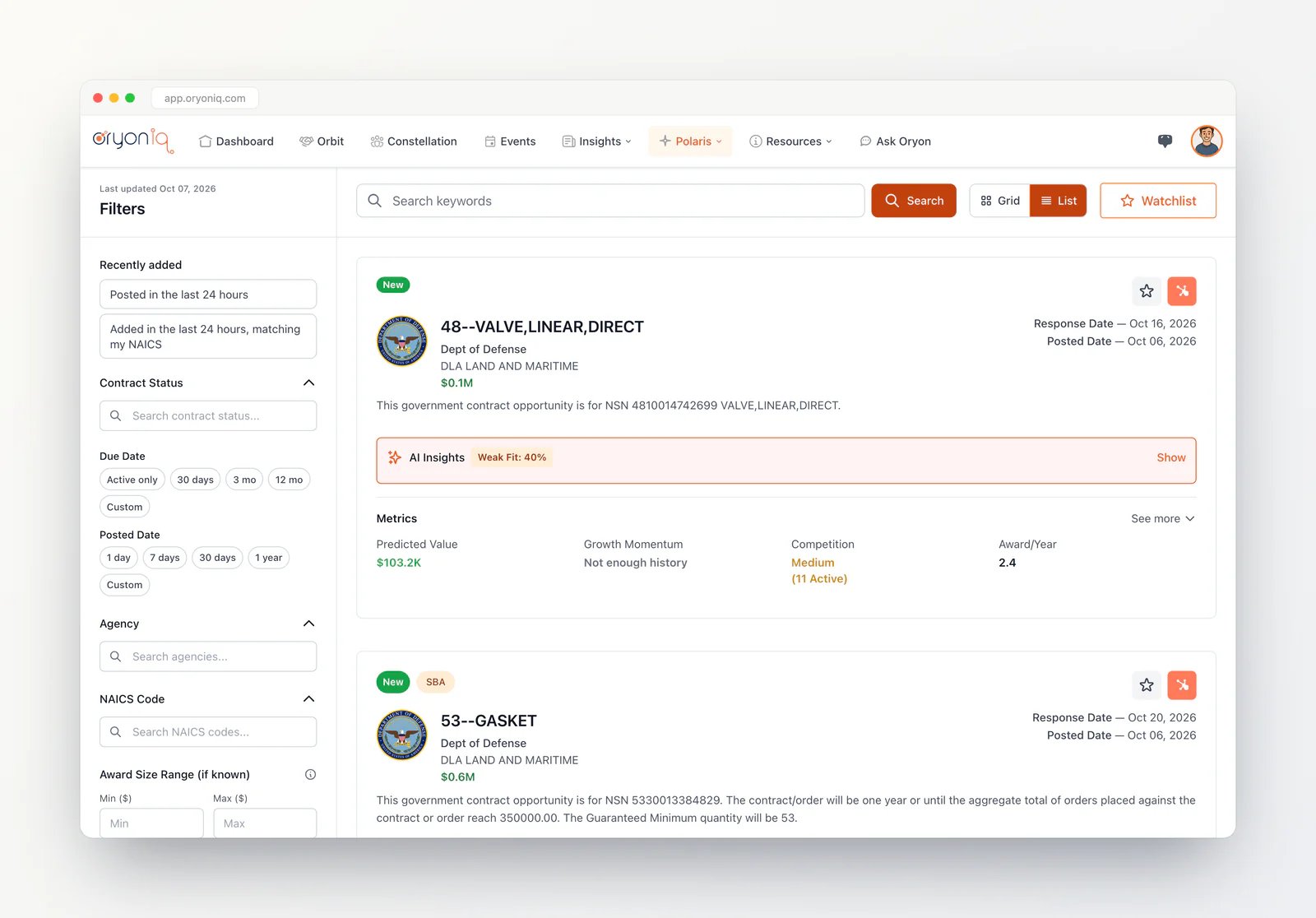
SAM.gov results next to the full filter rail
On lower plans, SAM.gov lists and searches stop at a set number of results. Navigator lifts that cap and shows the fullest AI Insights and Metrics. See Plans and tiers.
How do I find opportunities that fit my business?
1
Open SAM.gov
Select Polaris in the top navigation, then SAM.gov under Live Opportunities. On your first visit a short page tour walks you through the screen. Select Don’t show page tips if you’d rather skip it.
2
Search by keyword
Type a product, service or program name in the Search keywords box and select Search.
3
Narrow the list
In the Filters rail, pick Active only under Due Date to hide notices that have closed. Then pick your codes under NAICS Code. If you compete for small business set-asides, add a Set-Aside Type too.
4
Scan the cards
Switch between Grid and List at the top right. Use Previous and Next at the bottom to page through results.
5
Open a notice
Select an opportunity card to open its detail page. Back to results takes you back to the list.
What do the SAM.gov filters do?
How do I read an opportunity card?
Each card opens with badges. New marks a recent notice, and a chip such as SBA, WOSB or 8A shows the set-aside. Below that you see the agency seal, the title, the agency and office, and the estimated value in green. Response Date and Posted Date sit at the top right, with a one-line description underneath. The AI Insights strip gives the notice a fit label with a percentage, for example Weak Fit: 40%. Select Show to read the full insight. The Metrics row has four numbers: Predicted Value, Growth Momentum, Competition and Award/Year. Select See more for the rest. “Not enough history” appears when there isn’t enough past data to work out a metric. At the top right of the card, the star saves the notice and the orange HubSpot icon sends it to your CRM.What’s on the opportunity detail page?
The detail page has a breadcrumb (Home / SAM / title) and tabs for Summary, Point(s) of Contact, Teaming request and Partner suggestions. A Documents tab can also appear.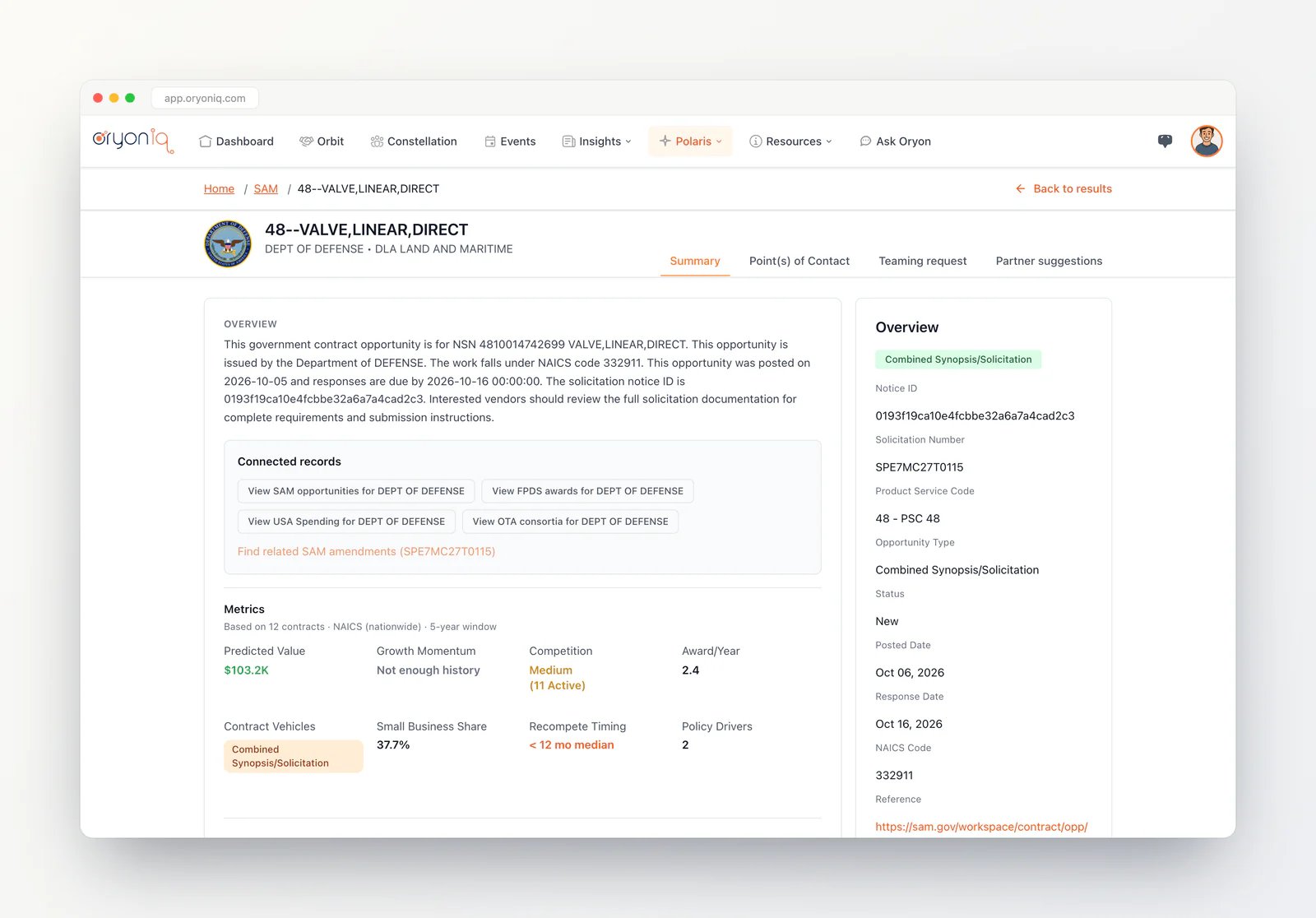
Summary tab with connected records and metrics
Overview text
Overview text
A plain-English summary of the notice: what’s being bought, the issuing agency, the NAICS code, posted and due dates, and the notice ID.
Connected records
Connected records
Buttons that jump to related Polaris data for the same agency: View SAM opportunities, View FPDS awards, View USA Spending and View OTA consortia. The Find related SAM amendments link searches by the solicitation number. Use the FPDS link to see who won this agency’s past work before you bid.
Metrics
Metrics
The four card metrics plus Contract Vehicles, Small Business Share, Recompete Timing and Policy Drivers. A line under the heading says what they’re based on, such as the number of contracts, the NAICS scope and a 5-year window.
Overview panel
Overview panel
The right-hand panel lists Notice ID, Solicitation Number, Product Service Code, Set Aside(s), Opportunity Type, Status, Posted Date, Response Date and NAICS Code. The Reference link opens the notice on sam.gov. Add to Watchlist and HubSpot sit here too.
Documents
Documents
A notice that hasn’t been checked for attachments yet reads “We haven’t checked this notice for attachments yet.” Select Check SAM.gov for documents to look.
Point(s) of Contact
Point(s) of Contact
The contacts listed on the notice for questions about the opportunity.
How do I find teaming partners for an opportunity?
Two sections on the detail page help you build a team for a specific pursuit. The Teaming Request section lists companies that have said they want to partner on this contract. To post your own call, select Open Call for Partners. If nobody has posted yet, you see “No teaming calls yet. Be the first to open a call for partners.” The Partner suggestions section shows “High-synergy partners that align with this contract and match your company profile.” Each suggestion has the company name with a DSBS badge and an SBA VERIFIED BUSINESS tag. You also see a contact, past teams, whether it matches the opportunity NAICS, shared PSCs, location, mutual connections and a score out of 5. Select Refresh to reload the list, or Show 10 more for additional companies.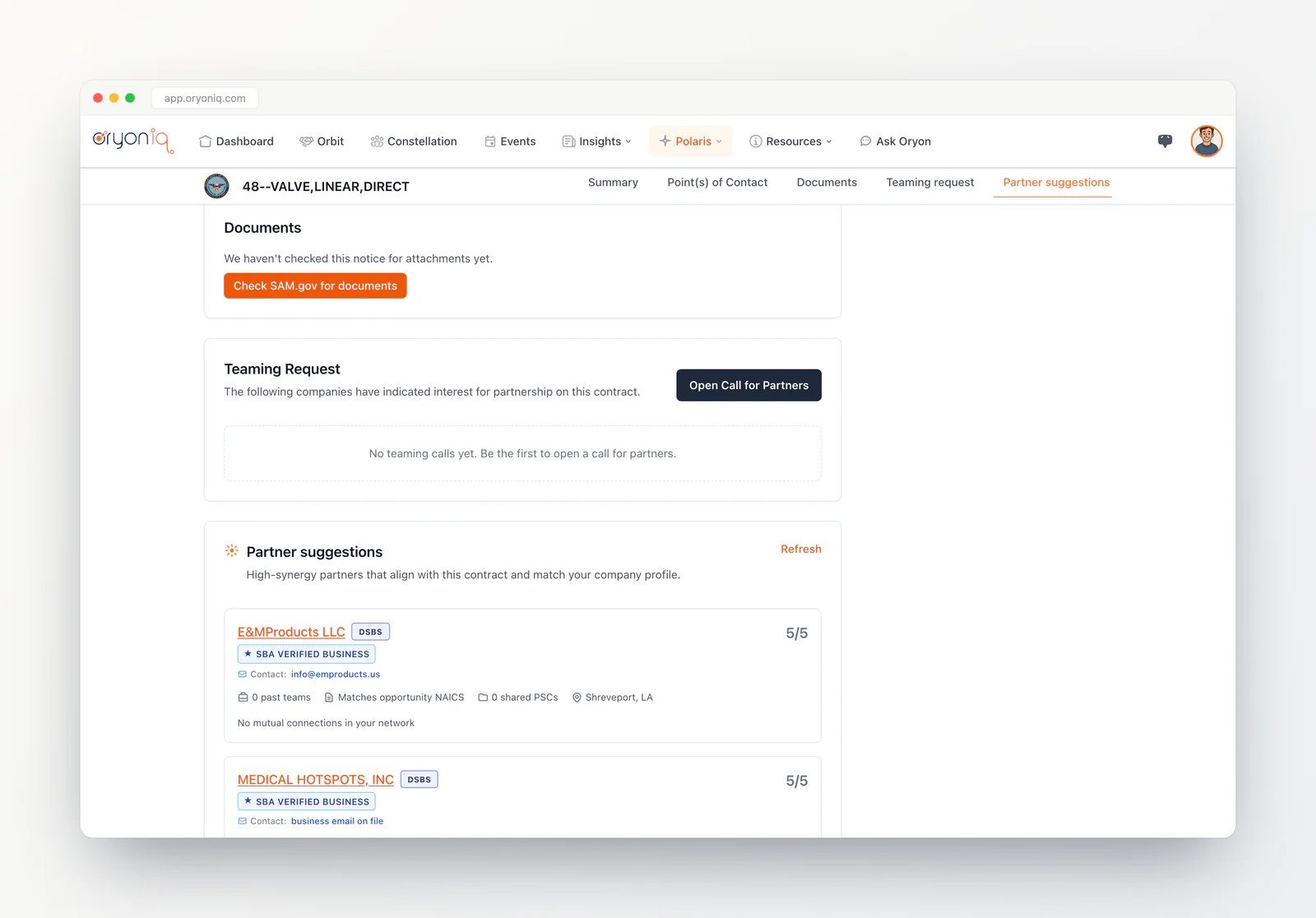
Teaming Request and Partner suggestions on one notice