

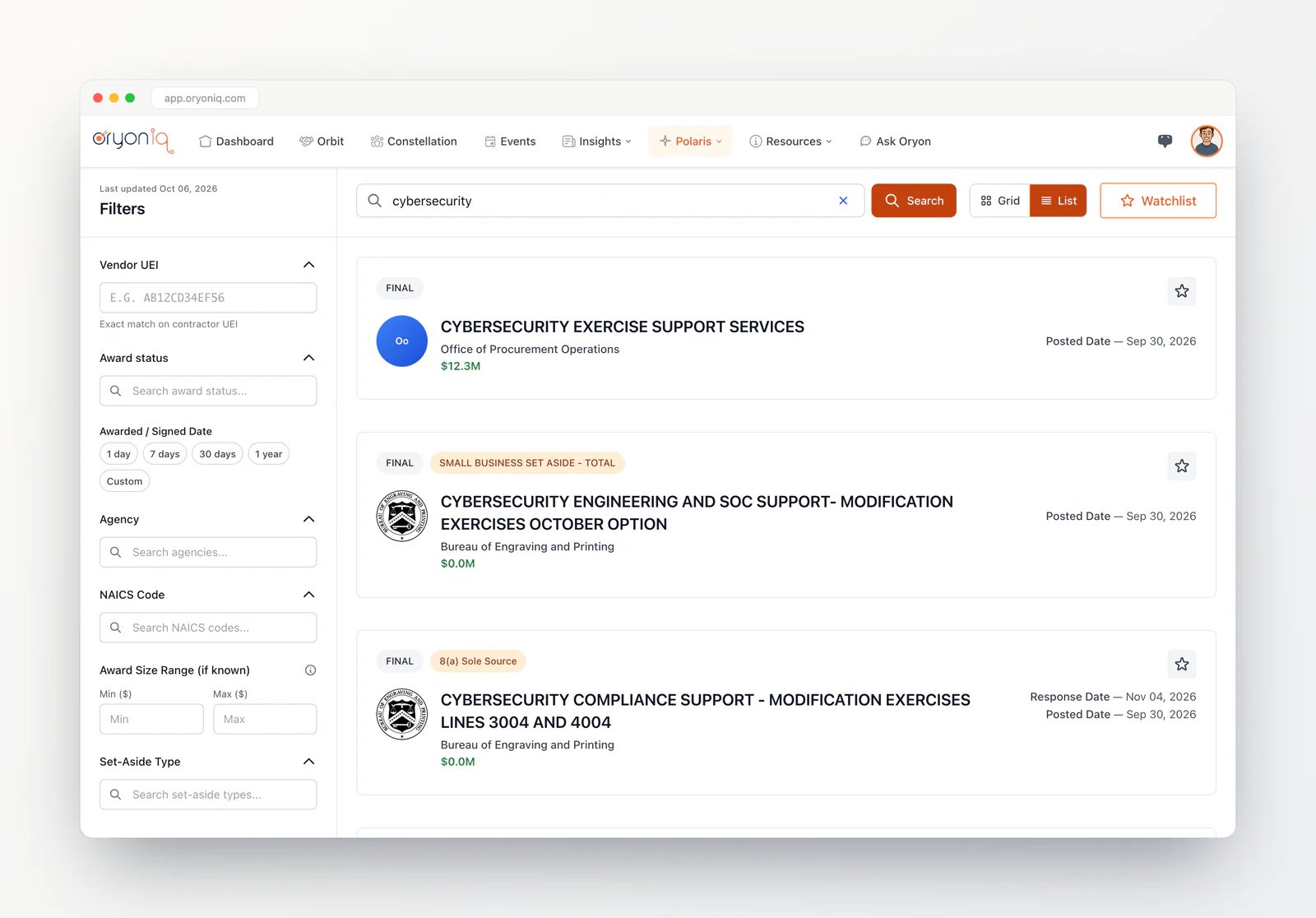
FPDS results after a cybersecurity search
FPDS results are capped on lower plans, and Launchpad also limits how many records you can open each day. Navigator has unlimited FPDS search and list results. See Plans and tiers.
Where does the FPDS data come from?
FPDS is the government’s system for reporting federal contract awards. That award data is now published through SAM.gov Contract Data, and OryonIQ Polaris brings it into the FPDS module. The top of the Filters rail shows “Last updated” with a date, so you can see how fresh the list is. FPDS covers awards that already happened. For open solicitations, use SAM.gov instead.How do I search FPDS awards?
1
Open FPDS
Select Polaris in the top navigation, then FPDS under Market and Spend Intel.
2
Search by keyword, vendor or ID
The search box hint reads “Search keywords, vendor name, PIID, or UEI”. Type a scope term, a company name or a contract number, then select Search.
3
Narrow the list
Add filters on the left. To see one company’s awards, paste its UEI into Vendor UEI. The filter only returns exact matches.
4
Open an award
Select a card to open the award record. Select Back to results to return to the list.
5
Save it
Select the star on the card, or Add to Watchlist in the Key facts panel. Saved awards appear on the FPDS tab of My watchlists.
FPDS filters reference
Vendor UEI
Vendor UEI
Enter a contractor’s 12-character Unique Entity ID. The hint under the box reads “Exact match on contractor UEI”, so a partial ID won’t return results.
Award status
Award status
A searchable list of statuses. Each card shows its status as a badge, such as FINAL.
Awarded / Signed Date
Awarded / Signed Date
Presets for 1 day, 7 days, 30 days and 1 year, or Custom for your own range.
Agency
Agency
Search for an agency and pick it to see only that agency’s awards.
NAICS Code
NAICS Code
Search by code or industry name. Pair it with Agency to see who buys your kind of work.
Award Size Range (if known)
Award Size Range (if known)
Set a Min ($), a Max ($) or both to focus on awards of a certain size.
Set-Aside Type
Set-Aside Type
A searchable list of set-aside types. Cards show the set-aside as a chip, for example SMALL BUSINESS SET ASIDE - TOTAL or 8(a) Sole Source.
What’s in an FPDS award record?
The header shows the award title with the agency and contracting office under it. Tabs across the header match the parts of the record: Summary, Identifiers, Organization, Classification, Contractor, Performance, Financials, Contract family and Administration.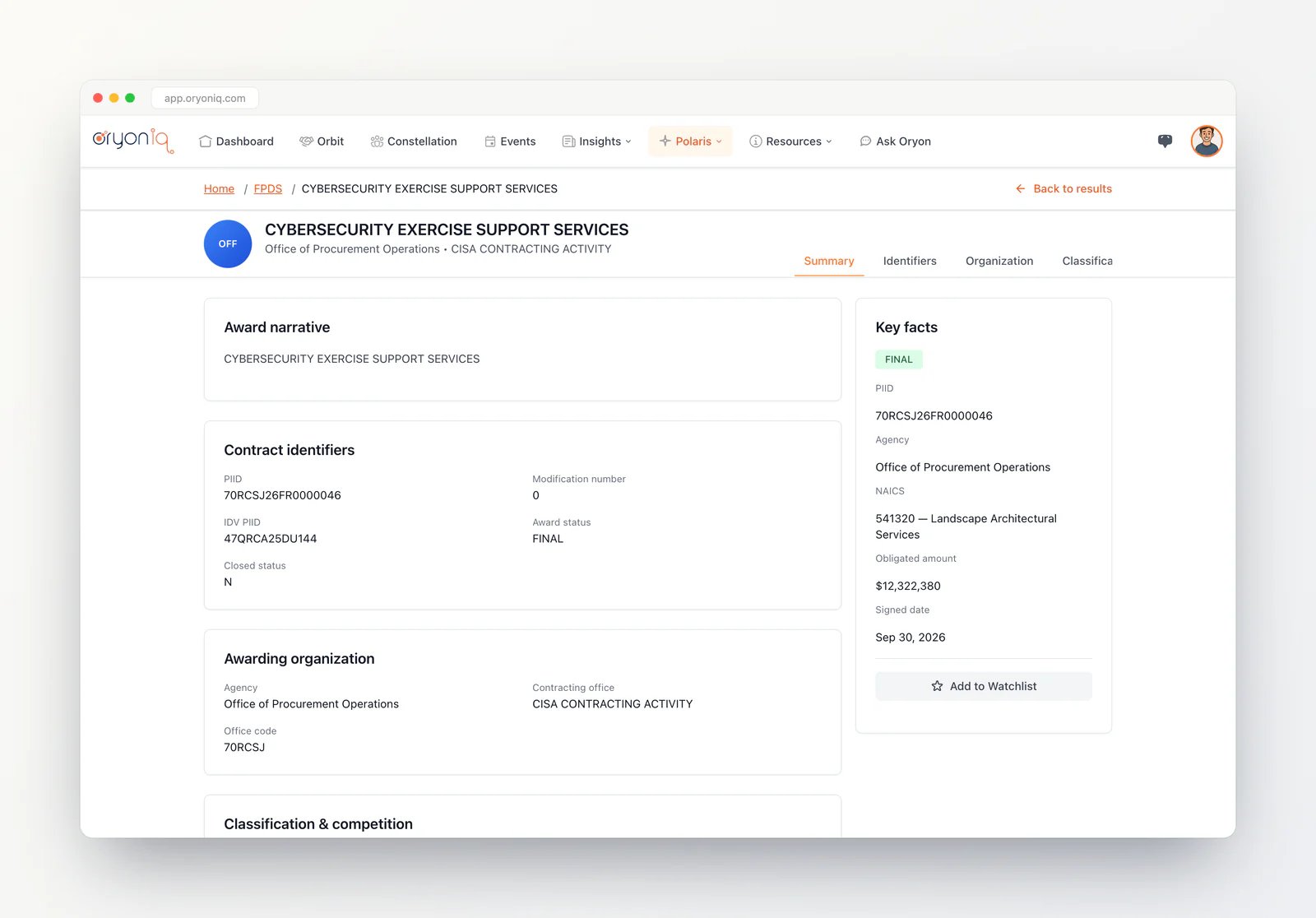
An award record on the Summary tab
The Key facts panel on the right repeats the essentials: status, PIID, Agency, NAICS, Obligated amount and Signed date. Add to Watchlist sits at the bottom of the panel.
How do capture teams use FPDS?
Find the incumbent
Search by scope and agency, open the award, and check Contractor for the vendor name, UEI and parent company.
Prep for a recompete
Record metadata shows completion dates. The Base and all options value tells you how large the contract could grow before it comes back around.
Ground your pricing
Compare obligated amounts on similar awards in the same NAICS code and agency before you set your price.
Track a competitor
Paste a rival’s UEI into Vendor UEI to list the awards they’ve won, then save the ones that matter.