

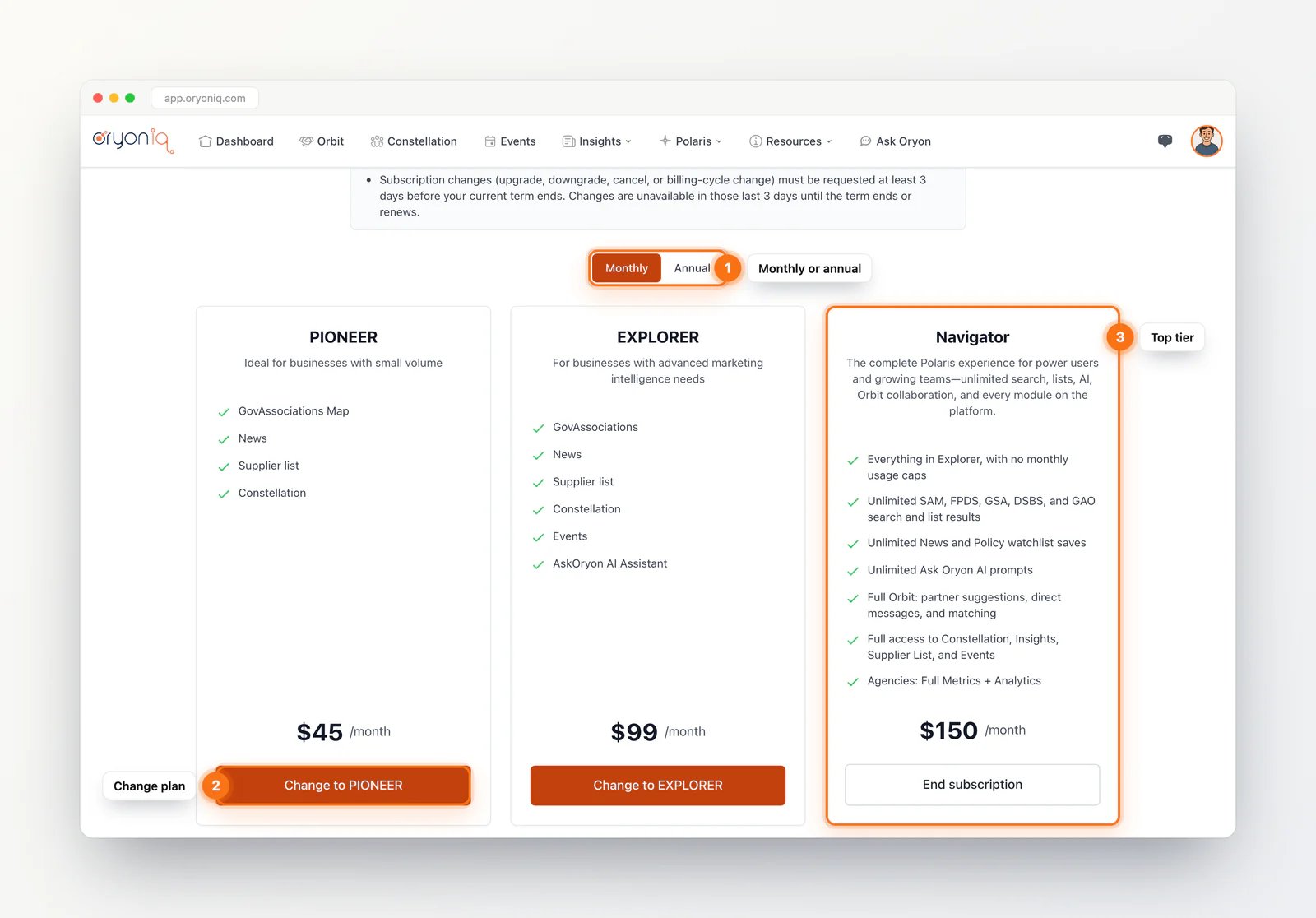
Monthly prices on the upgrade page
You can change plans from the Your Subscription card on your profile, as long as your current term has at least 3 days left. See Upgrade your plan.
How much does OryonIQ cost?
Annual billing works out to 2 months free on every paid plan. Pioneer, for example, costs $450 a year instead of $540 paid monthly. Navigator costs $1,500 a year instead of $1,800.
Which OryonIQ plan is right for me?
Launchpad (free)
Launchpad is for trying OryonIQ before you pay. You get 3 Ask Oryon prompts a month. Polaris lists and searches show a capped number of results, and there’s a daily limit on how many records you can open.Pioneer
The Pioneer card says “Ideal for businesses with small volume.” It lists the GovAssociations Map, News, the Supplier List and Constellation, and you get 20 Ask Oryon prompts a month. It suits a small firm that has a few active pursuits and wants to join the member community.Explorer
Explorer’s tagline is “For businesses with advanced marketing intelligence needs.” Its card adds Events to the Pioneer list and names the Ask Oryon AI assistant, with 100 prompts a month instead of 20. Pick it if your team researches agencies and partners every week.Navigator
Navigator’s card calls it “The complete Polaris experience for power users and growing teams” and lists:- Everything in Explorer, with no monthly usage caps
- Unlimited SAM, FPDS, GSA, DSBS and GAO search and list results
- Unlimited News and Policy watchlist saves
- Unlimited Ask Oryon AI prompts
- Full Orbit: partner suggestions, direct messages and matching
- Full access to Constellation, Insights, Supplier List and Events
- Agencies: full metrics and analytics
What happens when I reach a limit?
Ask Oryon shows a counter such as “Monthly prompts: 0 / 20”. Once you use your last prompt, you see “You’ve reached your monthly Ask Oryon prompt limit” along with the plan cards. In Polaris modules, an upgrade panel appears once you reach your plan’s result cap. Navigator has neither cap.How do I upgrade my OryonIQ plan?
1
Open your profile
Select your avatar at the top right and choose Settings, or select Edit on your dashboard profile card.
2
Select Upgrade plan
The Your Subscription card in the left column shows your plan and expiry date. Select Upgrade plan.
3
Choose a billing cycle and plan
Pick Monthly or Annual, then select the button on the plan you want. If you’re on Launchpad, you see buttons such as Subscribe to PIONEER. If you already pay, you see buttons such as Change to EXPLORER.